May 22, 2012

Conduct and Interpret a Multiple Linear Regression

What is Multiple Linear Regression?

Multiple linear regression is the most common form of the regression analysis.  As a predictive analysis, multiple linear regression is used to describe data and to explain the relationship between one dependent variable and two or more independent variables.

At the center of the multiple linear regression analysis lies the task of fitting a single line through a scatter plot.  More specifically, the multiple linear regression fits a line through a multi-dimensional cloud of data points.  The simplest form has one dependent and two independent variables.  The general form of the multiple linear regression is defined as for i = 1…n.

Sometimes the dependent variable is also called endogenous variable, criterion variable, prognostic variable or regressand.  The independent variables are also called exogenous variables, predictor variables or regressors.

Multiple Linear Regression Analysis consists of more than just fitting a linear line through a cloud of data points.  It consists of three stages: 1) analyzing the correlation and directionality of the data, 2) estimating the model, i.e., fitting the line, and 3) evaluating the validity and usefulness of the model.

There are three major uses for Multiple Linear Regression Analysis: 1) causal analysis, 2) forecasting an effect, and 3) trend forecasting.  Other than correlation analysis, which focuses on the strength of the relationship between two or more variables, regression analysis assumes a dependence or causal relationship between one or more independent and one dependent variable.

Firstly, it might be used to identify the strength of the effect that the independent variables have on a dependent variable.  Typical questions would seek to determine the strength of relationship between dose and effect, sales and marketing spend, age and income.

Secondly, it can be used to forecast effects or impacts of changes.  That is to say, multiple linear regression analysis helps us to understand how much the dependent variable will change when we change the independent variables.  A typical question would be “How much additional Y do I get for one additional unit X?”

Thirdly, multiple linear regression analysis predicts trends and future values.  The multiple linear regression analysis can be used to get point estimates.  Typical questions might include, “What will the price for gold be six months from now? What is the total effort for a task X?”

The Multiple Linear Regression in SPSS

Our research question for the multiple linear regression is as follows:

Can we explain the reading score that a student achieved on the standardized test with the five aptitude tests?

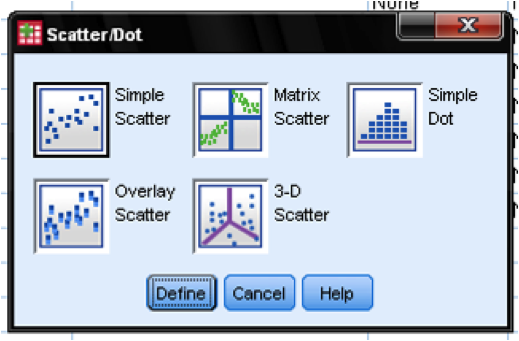
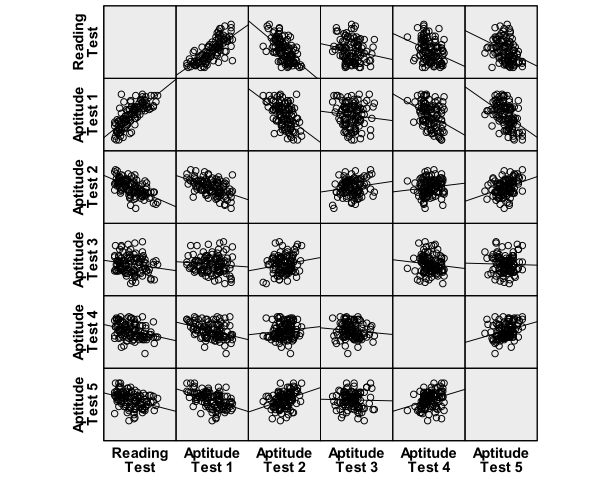
First, we need to check whether there is a linear relationship between the independent variables and the dependent variable in our multiple linear regression model.  To do so, we check the scatter plots.  We could create five individual scatter plots using the Graphs/Chart Builder… Alternatively we can use the Matrix Scatter Plot in the menu Graphs/Legacy Dialogs/Scatter/Dot…

The scatter plots indicate a good linear relationship between writing score and the aptitude tests 1 to 5, where there seems to be a positive relationship for aptitude test 1 and a negative linear relationship for aptitude tests 2 to 5.
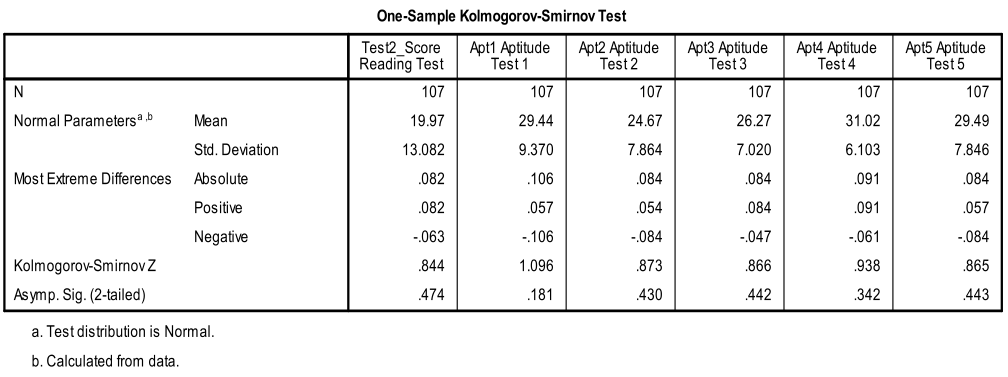
Secondly, we need to check for multivariate normality.  This can either be done with an ‘eyeball’ test on the Q-Q-Plots or by using the 1-Sample K-S test to test the null hypothesis that the variable approximates a normal distribution.  The K-S test is not significant for all variables, thus we can assume normality.
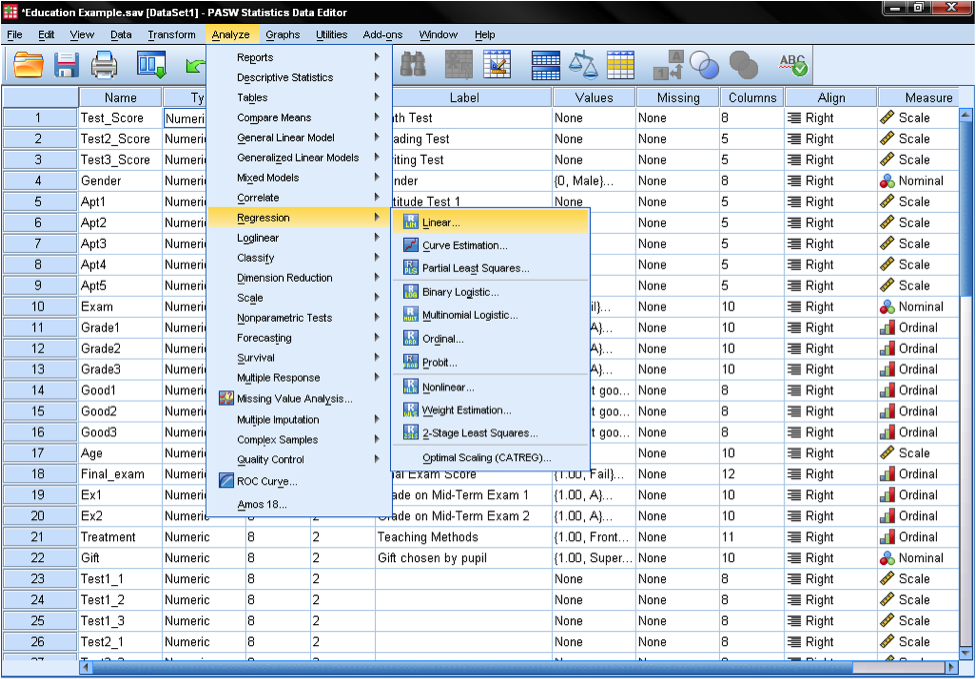
Multiple linear regression is found in SPSS in Analyze/Regression/Linear…
To answer our research question we need to enter the variable reading scores as the dependent variable in our multiple linear regression model and the aptitude test scores (1 to 5) as independent variables.  We also select stepwise as the method.  The default method for the multiple linear regression analysis is ‘Enter‘, which means that all variables are forced to be in the model.  But since over-fitting is a concern of ours, we want only the variables in the model that explain additional variance.  Stepwise means that the variables are entered into the regression model in the order of their explanatory power.
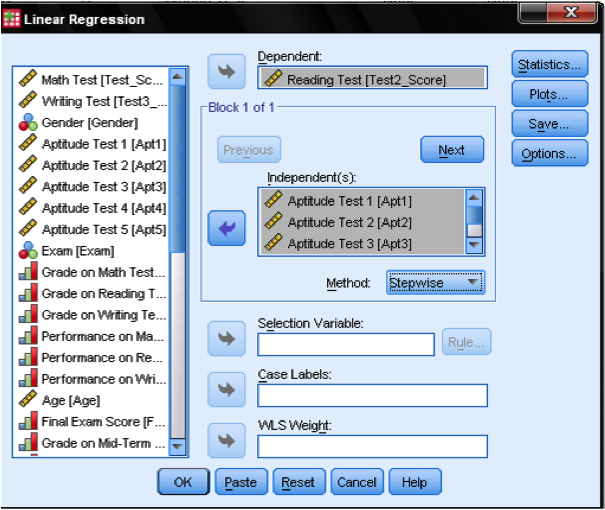
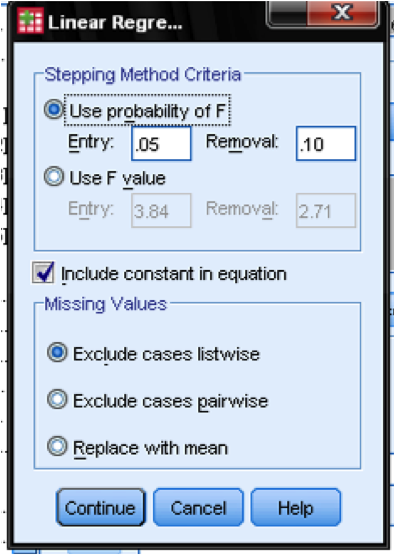
In the field Options… we can define the criteria for stepwise inclusion in the model.  We want to include variables in our multiple linear regression model that increase F by at least 0.05 and we want to exclude them again if the increase F by less than 0.1.  This dialog box also allows us to manage missing values (e.g., replace them with the mean).
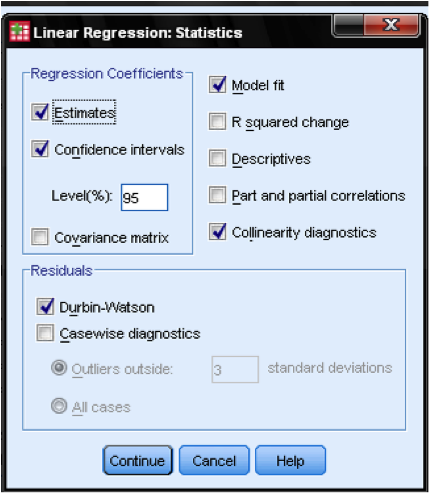
The dialog Statistics… allows us to include additional statistics that we need to assess the validity of our linear regression analysis.  Even though it is not a time series, we include Durbin-Watson to check for autocorrelation and we include the collinearity that will check for autocorrelation.
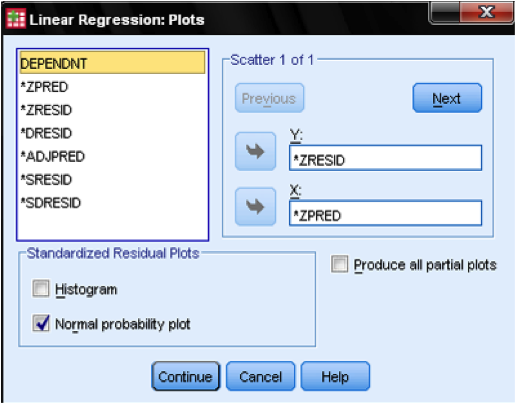
In the dialog Plots…, we add the standardized residual plot (ZPRED on x-axis and ZRESID on y-axis), which allows us to eyeball homoscedasticity and normality of residuals.
The Output of the Multiple Linear Regression Analysis

The first table tells us the model history SPSS has estimated.  Since we have selected a stepwise multiple linear regression SPSS automatically estimates more than one regression model.  If all of our five independent variables were relevant and useful to explain the reading score, they would have been entered one by one and we would find five regression models.  In this case however, we find that the best explaining variable is Aptitude Test 1, which is entered in the first step while Aptitude Test 2 is entered in the second step.  After the second model is estimated, SPSS stops building new models because none of the remaining variables increases F sufficiently.  That is to say, none of the variables adds significant explanatory power of the regression model.

The next table shows the multiple linear regression model summary and overall fit statistics.  We find that the adjusted R² of our model 2 is 0.624 with the R² = .631.  This means that the linear regression model with the independent variables Aptitude Test 1 and 2 explains 63.1% of the variance of the Reading Test Score.  The Durbin-Watson d = 1.872, which is between the two critical values of 1.5 and 2.5 (1.5 < d < 2.5), and therefore we can assume that there is no first order linear autocorrelation in our multiple linear regression data.

If we would have forced all independent variables (Method: Enter) into the linear regression model we would have seen a little higher R² = 80.2% but an almost identical adjusted R²=62.5%.

The next table is the F-test, or ANOVA.  The F-Test is the test of significance of the multiple linear regression.  The F-test has the null hypothesis that there is no linear relationship between the variables (in other words R²=0).  The F-test of or Model 2 is highly significant, thus we can assume that there is a linear relationship between the variables in our model.

The next table shows the multiple linear regression coefficient estimates including the intercept and the significance levels.  In our second model we find a non-significant intercept (which commonly happens and is nothing to worry about) but also highly significant coefficients for Aptitude Test 1 and 2.  Our regression equation would be: Reading Test Score = 7.761 + 0.836*Aptitude Test 1 – 0.503*Aptitude Test 2.  For every additional point achieved on Aptitude Test, we can interpret that the Reading Score increases by 0.836, while for every additional score on Aptitude Test 2 the Reading Score decreases by 0.503.

Since we have multiple independent variables in the analysis the Beta weights compare the relative importance of each independent variable in standardized terms.  We find that Test 1 has a higher impact than Test 2 (beta = .599 and beta = .302).  This table also checks for multicollinearity in our multiple linear regression model.  Multicollinearity is the extent to which independent variables are correlated with each other.  Tolerance should be greater than 0.1 (or VIF < 10) for all variables—which they are.  If tolerance is less than 0.1 there is a suspicion of multicollinearity, and with tolerance less than 0.01 there is proof of multicollinearity.

Lastly, as the Goldfeld-Quandt test is not supported in SPSS, we check is the homoscedasticity and normality of residuals with an eyeball test of the Q-Q-Plot of z*pred and z*presid.  The plot indicates that in our multiple linear regression analysis there is no tendency in the error terms.

In summary, a possible write-up could read as follows:

We investigated the relationship between the reading scores achieved on our standardized tests and the scores achieved on the five aptitude tests.  The stepwise multiple linear regression analysis found that Aptitude Test 1 and 2 have relevant explanatory power.  Together the estimated regression model (Reading Test Score = 7.761 + 0.836*Aptitude Test 1 – 0.503*Aptitude Test 2) explains 63.1% of the variance of the achieved Reading Score with an adjusted R² of 62.4%.  The regression model is highly significant with p < 0.001 and F =88.854.  The standard error of the estimate is 8.006.  Thus we can not only show a  linear relationship between aptitude tests 1 (positive) and 2 (negative), we can also conclude that for every additional reading score achieved the reading score will increase by approximately 0.8 (Aptitude Test 1) and decrease by 0.5 (Aptitude Test 2).

Syntax

GRAPH

/SCATTERPLOT(MATRIX)=Test2_Score Apt1 Apt2 Apt3 Apt4 Apt5

/MISSING=LISTWISE.

NPAR TESTS

/K-S(NORMAL)=Test2_Score Apt1 Apt2 Apt3 Apt4 Apt5

/MISSING ANALYSIS.

REGRESSION

/MISSING LISTWISE

/STATISTICS COEFF OUTS CI(95) R ANOVA COLLIN TOL

/CRITERIA=PIN(.05) POUT(.10)

/NOORIGIN

/DEPENDENT Test2_Score

/METHOD=STEPWISE Apt1 Apt2 Apt3 Apt4 Apt5

/SCATTERPLOT=(*ZRESID ,*ZPRED)

/RESIDUALS DURBIN NORMPROB(ZRESID).